
- Table of Contents
Problem
We are building a moderately large application with ReactJS. React is well-abstracted, which means you can swap in different libraries for almost every part of the stack. This post summarizes the decisions a developer needs to make and the options available.
Development environment
- ReactJS
- Node v10
Solution
When I started my first React project I was genuinely astonished. There were competing libraries for every critical area of the application. Amazing. You could really feel that the React framework itself was designed with extensibility in mind. In this post I introduce four challenging areas of a frontend application and the libraries that address them.
State Management
Redux vs MobX vs Hook + context
When I first searched for React tutorials I was thoroughly confused. I had barely wrapped my head around React itself, and then there was Redux, and MobX, and everyone was recommending something different, and what appeared in one tutorial was absent from another — what on earth was the right answer? That was my experience.

Redux
Redux is a library that has been used alongside React since the very early days. It is written around the Flux state-management pattern and enforces strict rules about how the store may change. Actions and reducers are kept separate — in other words, the act of issuing a command is decoupled from the act of changing state. State is never partially updated; instead it is always replaced by a brand-new object.

MobX
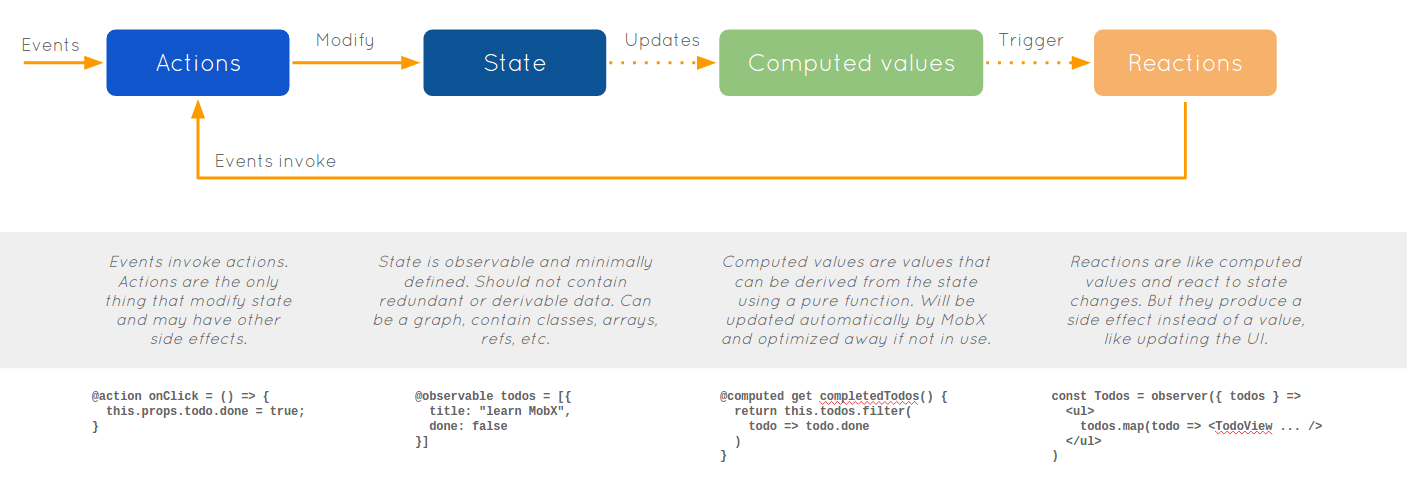
MobX is a library that lets you work with RxJS-style reactivity. It is less strict than Redux, which makes it better suited for smaller applications. MobX applies reactive programming concepts and uses Observables.
Hook + context API
React Hooks is a feature introduced in React 16.8. The main advantage is that you can use it without importing any additional library. As a consequence it is naturally better suited for smaller-scale applications. You can propagate changes down a component tree using Context.Provider, and subscribe to those changes by declaring a .Consumer.
I haven't used this approach in production yet, so more research is needed.
Middleware (Asynchronous Processing)
Thunk vs Saga vs Observable
This is arguably the single biggest pain point for frontend developers. Because most languages execute synchronously, asynchronous behaviour is not intuitive for many developers. Setting aside the philosophical discussion, it is critically important: how do you request data from the server, send new data back, and — most importantly — refresh the UI seamlessly without interrupting the user experience? That is the question.
Thunk and Saga are both used in combination with Redux.
Thunk
In plain Redux, dispatching always requires an action object. With Redux-thunk, however, you can dispatch an action creator function instead. Simply put, rather than executing an action immediately, it lets you run any work you want first and then fire the action afterwards. It is a simple enough middleware that it is included in the official Redux tutorial.
Saga

Redux-Saga aims to make an application's side effects — asynchronous operations such as data fetching, and impure things like browser caching — easy to manage, efficient to execute, straightforward to test, and simple to handle on failure. Saga provides several built-in mechanisms of its own. Simply adding yield wherever asynchronous processing is needed makes the code behave as if it were written synchronously. This may remind you of async/await, and the two are indeed similar. You integrate a saga with the Redux store and use takeLatest to bind an action to a saga function; the bound saga function then runs as soon as that action completes.
Server-Side Rendering
NextJS vs. Gatsby vs. CRA
For applications that are not enterprise-scale, you often do not need to think about this at all — client-side rendering is fast enough in most cases. However, when you need per-page thumbnails or have a large amount of data to render, server-side rendering becomes relevant.
NextJS
 You can think of NextJS as React with an opinionated folder structure and pre-defined routing rules. The source directory must contain a
 pages folder, under which you create the pages to be routed to. Common imports and configuration can be handled in _App.js and _Document.js.Inside a React class you can declare the following function to define work that should happen when the page is rendered on the server:
static async getInitialProps (props) {
    const { store, isServer } = props.ctx
    return { isServer }
}
Styling
jsx style vs Styled Component vs CSS Module vs etc...
Frontend developers really do have a lot on their plate. On top of navigating React's complex ecosystem, you also have to apply styles. Naming a className for every single div, then attaching the corresponding styles — you could watch the sun set several times before you finish.
jsx style
jsx style is the approach provided out of the box, without any additional library.
return (
    <div className={light ? 'light' : ''}>
      {format(new Date(lastUpdate))}
      <style jsx>{`
        div {
          padding: 15px;
          display: inline-block;
          color: #82fa58;
          font: 50px menlo, monaco, monospace;
          background-color: #000;
        }
        .light {
          background-color: #999;
        }
      `}</style>
    </div>
  )
As shown above, styles are declared inside JSX syntax and you must specify a className. It is the easiest and most immediate way to apply styles. As the application grows, however, problems can emerge because duplicating and isolating styles is not straightforward.
Styled Component
const ButtonWrapper = styled.div`
    text-align: center;
  `

const Button = styled.button`
  width: 40%;
  &:not(:last-child) {
    margin-right: 10%;
  }
  `

return (
  <ButtonWrapper>
    <Button>
        View Details
    </Button>
    <Button>
        Purchase
    </Button>
  </ButtonWrapper>
)
All that talk about className above was a lead-up to highlighting the power of Styled Components. You apply styles by declaring a styled component and wrapping your elements with it. You can declare the styled component in the same file, or extract it as a separate wrapper component. The component's className is generated automatically at render time and the styles are applied accordingly. Styled Components use the ES6 Template Literals feature.
Other libraries in this space include Radium, Aphrodite, and many more. The article 9 CSS-in-JS Libraries You Should Know in 2018 is worth reading.
Bonus: Folder Structure
Reading through many tutorials you will frequently come across the phrase "it depends on the developer's preference." You are free to name folders and define hierarchy however is comfortable for you. I don't have strong convictions on this yet either, so I develop however feels natural at the time. The biggest decision is whether to organize components by feature or by concern. Personally I tend to prefer organizing by feature.
Bonus: Testing Framework
If something feels missing, it's tests. The project hasn't reached a size where testing feels necessary yet (that view itself is debatable), so there are no tests. I'll look into testing frameworks in a separate post.
Conclusion
I wrote this hoping it would serve as a guide for anyone just starting to think about structuring their first React project. Researching each of these libraries individually takes real time, and I hope this saves some of that effort. Rather than declaring one option better or worse than another, the right choice depends on the characteristics of your project.
At the moment I am building with Redux + Saga + Styled Components, a combination I chose because the application is on the larger side. So far development has been smooth with no major pain points.
If you spot any inaccuracies or know of newer libraries worth mentioning, please leave a comment — I would appreciate it.
Happy frontend development!
References
- React Official Website
- My Experience with MobX in React (Comparison with Redux)
- redux-saga GitHub
- About Redux-saga
- Redux Middleware and Asynchronous Operations (Integrating External Data)
- Learning React in Korean
- Building Scalable Applications using React — Part 1: Choosing the right mix of tools
- React Context Quick Summary